
How to End an Email Professionally

Trust Score: 4.8
389 reviews
Table of Contents
Introduction: Why Email Closings Matter
Most people spend time crafting the subject line and the opening sentence of an email—but rush through the ending. That final line, however, is often the last thing your reader remembers. Whether you’re emailing a recruiter, professor, client, or colleague, the way you end an email can quietly influence how professional, confident, and credible you appear.
A well-written email closing does more than signal the end of your message. It reinforces your professionalism, subtly guides the recipient on what to do next, and reflects your overall communication skills. In professional settings, the right closing can encourage a response, strengthen relationships, or leave a positive impression long after the email is read.
When done correctly, a strong email closing:
 Reinforces professionalism, showing respect for the recipient and the context
- Clarifies intent, whether you’re expecting a reply, requesting action, or simply expressing courtesy
- Reflects strong communication skills, signaling attention to detail and tone awareness
Unfortunately, many people weaken their emails with common mistakes—using overly casual sign-offs, sounding unintentionally demanding, repeating the same closing in every email, or forgetting to align the ending with the message’s purpose. These small errors can undermine even the most well-written email body.
Understanding how to end an email professionally isn’t just about etiquette it’s about impact. Mastering the right professional email closing ensures your message ends with clarity, confidence, and the right tone, setting the stage for better responses and stronger professional relationships.
Elements of Closing an Email
A professional email doesn’t end abruptly it closes with intention. The strongest email closings follow a clear structure that guides the reader, maintains the right tone, and reinforces credibility. Below are the key elements that make an email ending effective and professional.
Call to action as a closing remarks in ending an email
The closing remark is the final sentence before your sign-off, and it plays a crucial role in setting expectations. It subtly tells the recipient what you’re hoping for whether that’s a response, action, or simple acknowledgment.
Purpose:
- Guides the recipient on the next step
- Adds politeness and clarity
- Prevents your email from feeling incomplete or abrupt
Examples:
Thank you for taking the time to review my resume and professional references. I look forward to hearing from you soon! “Please let me know if you need any additional information.” “Thank you for your time and consideration.”
A well-chosen closing remark makes it clear why you’re ending the email and what should happen next.
Signing off part in ending the email
The sign-off is your professional goodbye. It sets the emotional tone of your email and should align with both the message and your relationship with the recipient.
Key considerations:
- Formal emails (job applications, professors, senior executives) require formal sign-offs
- Semi-formal or internal emails allow for warmer, neutral closings
- The sign-off should never contradict the tone of the message
Using the right sign-off ensures your email ends on a respectful and appropriate note.
Your Full Name
Including your full name helps avoid confusion, especially in professional, academic, or first-time communications.
Best practices:
- Avoid using initials unless the recipient already knows you well
- Use the same name consistently across emails and documents
- Ensure spelling accuracy to maintain professionalism
Your name reinforces accountability and makes your message easier to reference later.
Professional Signature
A professional email signature provides essential context and makes it easy for recipients to follow up without searching for your details.
What to include:
- Job title
- Company or organization name
- Phone number
- LinkedIn profile (optional but highly recommended)
Why it matters:
A well-structured signature builds credibility, supports professional branding, and simplifies future communication—especially in ongoing or formal conversations.
Professional Email Ending Examples
Seeing how professional email endings work in real situations makes it much easier to choose the right one. Below are detailed examples of email closing lines and sign-offs tailored for common professional scenarios, so you can confidently end any email with the right tone.
1. Job Application Email Endings
When applying for a job, your email ending should sound polite, confident, and respectful, reinforcing the professionalism of your resume and cover letter.
Email closing lines:
“Thank you for your time and consideration.” “I appreciate the opportunity to apply for this position.” “I look forward to the opportunity to discuss my application further.”
Sign-off examples:
- Sincerely,
- Best regards,
- Kind regards,
Full example:
Thank you for your time and consideration.
Best regards,
Ranjana Tiwari
2. Professional Workplace Email Endings
For internal communication or client emails, aim for a neutral and courteous tone that encourages collaboration.
Email closing lines:
“Please let me know if you need any additional information.” “Looking forward to your feedback.” “Happy to discuss this further if needed.”
Sign-off examples:
- Best,
- Regards,
- Thank you,
3. Emails That Require a Response
If your email needs a reply, the closing should gently prompt action without sounding pushy.
Email closing lines:
“I look forward to your response.” “Please let me know your thoughts when convenient.” “I would appreciate your response at your earliest convenience.”
Sign-off examples:
- Best regards,
- Thank you,
4. Follow-Up Email Endings
Follow-up emails should be clear, polite, and non-intrusive, especially when reminding someone about a previous message.
Email closing lines:
“Just following up on my previous message.” “Looking forward to your update.” “As discussed, I’ll follow up next week.”
Sign-off examples:
- Kind regards,
- Best,
5. Networking Email Endings
Networking emails benefit from a warm yet professional ending that encourages future communication.
Email closing lines:
“I look forward to connecting with you.” “It was great speaking with you.” “Hope to stay in touch.”
Sign-off examples:
- Best wishes,
- All the best,
6. Emails to Professors or Academic Professionals
Academic emails should remain formal, respectful, and concise.
Email closing lines:
“Thank you for your time and guidance.” “I appreciate your support.” “I look forward to your advice.”
Sign-off examples:
- Sincerely,
- Best regards,
7. Client & Business Email Endings
Client-facing emails should project professionalism, reliability, and clarity.
Email closing lines:
“Please feel free to reach out if you have any questions.” “I’m happy to assist further.” “Looking forward to working with you.”
Sign-off examples:
- Kind regards,
- Best regards,
8. Short & Simple Professional Email Endings
Sometimes, less is more—especially for quick updates.
Email closing lines:
“Thank you.” “Much appreciated.” “Looking forward.”
Sign-off examples:
- Best,
- Thanks,
Choosing the Right Closing for Specific Scenarios
Not every email has the same goal and your closing should reflect that. Whether you’re submitting a job application, networking with professionals, or following up on a conversation, choosing the right email ending can directly influence the response you receive.
In fact, just as a strong email closing reinforces professionalism, a well-structured resume strengthens your job application as a whole. When both your email and resume communicate clarity and confidence, you significantly improve your chances of standing out especially in competitive hiring environments. So here you can edit your resume from this template.
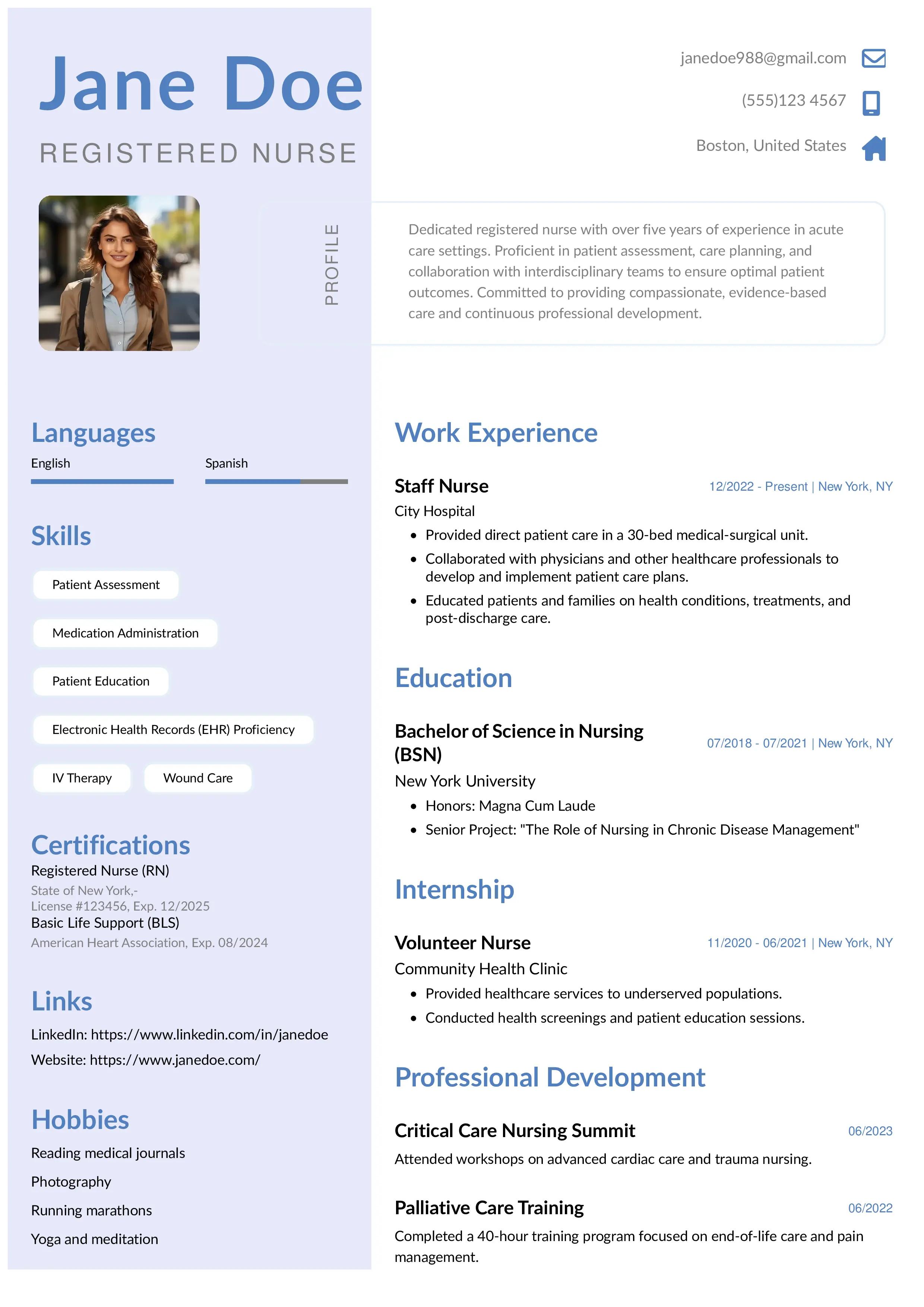
Registered nurse resume example
Edit and download this registered nurse resume example created using the Instaresume's creative resume template.
Ending the email in job applications
When emailing a resume or cover letter, your closing should express respect, gratitude, and readiness for the next step. Recruiters often review hundreds of applications, so a polished email ending helps reinforce your professionalism just like a well-formatted, ATS-friendly resume does.
Effective email closings for job applications:
“Thank you for your time and consideration.”
“I look forward to the opportunity to discuss my application.”
Ending the email in Networking Emails
Networking emails should feel warm yet professional, focusing on building long-term connections rather than immediate outcomes. Your closing should invite continued interaction without sounding transactional.
Effective email closings for networking:
“I look forward to connecting with you.” “Hope to stay in touch.”
These closings work especially well when you’ve shared your background, career goals, or a professional resume during the conversation to establish credibility.
How to end an email for requesting information
When requesting information, clarity and politeness are key. Your closing should encourage a response while making it easy for the recipient to engage further.
Effective email closings for information requests:
“Please let me know if you have any questions.” “I’d appreciate your guidance on this.”
This approach mirrors the principle of a good resume builder: clear structure, relevant details, and no unnecessary complexity.
How to end Follow-Up Emails
Follow-up emails should gently reconfirm next steps without sounding impatient. A strong closing reassures the recipient and keeps communication professional.
Effective email closings for follow-ups:
“Looking forward to your update.” “As discussed, I’ll follow up next week.”
When following up on job applications, combining a concise email closing with an updated, professionally designed resume can help reinforce your interest and attention to detail.
Sign-Offs to Avoid in Professional Emails
Just as the right email sign-off can strengthen your message, the wrong one can unintentionally undermine it. In professional and academic settings, certain sign-offs may appear careless, overly familiar, or even demanding. Understanding what to avoid helps ensure your email ends with the same level of professionalism it begins with.
Overly Casual Sign-Offs
These sign-offs may work in informal conversations but often feel out of place in professional emails.
- Cheers
- Peace
- Thanks!!!
Why avoid them:
They can make your email seem too relaxed or unserious, especially when writing to recruiters, professors, clients, or senior professionals. Excessive punctuation, such as multiple exclamation marks, can also appear unprofessional.
Overly Personal Sign-Offs
These sign-offs imply emotional closeness and are rarely appropriate in professional communication.
- Love
- Fondly
- Yours truly
Why avoid them:
They can blur professional boundaries and make recipients uncomfortable—particularly in first-time interactions or formal correspondence.
Potentially Passive-Aggressive Sign-Offs
Some sign-offs may sound polite on the surface but can feel pressuring depending on context.
- Thanks in advance
Why avoid it (or use cautiously):
In request-based emails, this phrase can come across as assuming compliance rather than asking politely. If the recipient has a choice, it may feel like a demand rather than a courtesy.
Abbreviations & Slang
Shortened forms and casual shorthand weaken professionalism.
- Thx
- Rgrds
- Tx
Why avoid them:
They suggest haste or lack of effort and can diminish credibility—especially in job applications, business emails, or academic communication.
Frequently Asked Questions (FAQ)
Should I use a comma after an email sign-off?
Yes. In professional email writing, a comma is typically placed after the sign-off (for example, Best regards,). This follows standard email and business letter etiquette and keeps your message polished and grammatically correct.
What is the best professional email closing?
There is no single “best” closing, but “Best regards,” “Sincerely,” and “Thank you” are widely accepted as professional and appropriate across most business and academic contexts. The best choice depends on the tone of your email and your relationship with the recipient.
How do you end an email that requires a response?
End the email with a clear but polite call to action. Phrases like “I look forward to your response” or “Please let me know if you need any additional information” signal that a reply is expected without sounding demanding.
Is “Best regards” formal or informal?
“Best regards” is considered semi-formal. It strikes a balance between professionalism and warmth, making it suitable for job applications, workplace emails, and communication with professors or clients.
How should I end an email to a professor?
Use a respectful and formal closing such as “Sincerely,” “Best regards,” or “Thank you for your time.” Avoid casual sign-offs, abbreviations, or overly familiar language in academic communication.
Can I use “Thanks” in a professional email?
Yes, “Thanks” is acceptable in professional emails, especially in semi-formal or internal communication. For highly formal situations, such as job applications or first-time contact, “Thank you” is usually a safer choice.
How do I end a group email professionally?
When writing to multiple recipients, choose a neutral and inclusive closing such as “Best regards,” “Thank you,” or “Kind regards.” Avoid personal or informal sign-offs that may not suit everyone in the group.