
30+ Best Practices for Professional Email Etiquette

Trust Score: 4.8
388 reviews
Table of Contents
In today’s digital-first workplace, email remains the most widely used professional communication tool. Whether you’re applying for a job, communicating with clients, coordinating with teammates, or following up with leadership, how you write your emails directly affects your professional image, credibility, and response rate.
Poor email etiquette can lead to misunderstandings, delayed replies, or even lost opportunities. On the other hand, professional email etiquette builds trust, clarity, and respect in every interaction.
35 Best Practices for Professional Email Etiquette (Complete List)
 Use a professional email address
- Write clear and relevant subject lines
- Start with an appropriate greeting
- Address recipients correctly
- Maintain a polite and respectful tone
- Be concise and purposeful
- Use correct grammar and spelling
- Avoid slang and casual language
- Structure emails with short paragraphs
- Use bullet points for clarity
- State your purpose early
- Avoid excessive capitalization
- Use CC and BCC responsibly
- Respond within a reasonable timeframe
- Proofread before sending
- Use professional sign-offs
- Add a clear email signature
- Avoid excessive punctuation
- Never send emails in anger
- Double-check attachments
- Include a clear call to action
- Avoid unnecessary “Reply All”
- Respect professional boundaries and work hours
- Keep email threads organized
- Follow up politely and professionally
- Use consistent formatting
- Be cautious with humor and sarcasm
- Personalize emails when appropriate
- Avoid vague or incomplete messages
- Use polite phrases appropriately
- Acknowledge important emails
- Ask permission before forwarding emails
- Protect confidential information
- Adjust tone based on the recipient
- End emails clearly and professionally
Detailed explanation of all 35 professional email etiquette tips
1. Use a professional email address
Your email address is the first indicator of professionalism. It should ideally include your real name and avoid nicknames, numbers, or casual words. A professional email builds trust and credibility, especially with recruiters and clients. Always use a clean and formal email ID for work communication.
Example:
Imagine a recruiter receiving two resumes for the same role. One email comes from coolgirl_1999@gmail.com and another from wonder.women@gmail.com Even before opening the resumes, the second email creates a more professional impression. For job applications, client communication, or official work, an email address with your real name immediately signals seriousness and reliability.
2. Write clear and relevant subject lines
A subject line should clearly state the purpose of the email so the recipient knows what to expect. Well-written subject lines improve open rates and reduce confusion. Avoid vague or misleading subjects. Keep them short but informative.
Example:
Instead of writing a subject like “Hi” or “Important”, write “Follow-Up on Resume Submission – Marketing Executive Role.” This tells the recipient exactly why you’re emailing and helps them prioritize your message. In a busy inbox, clear subject lines make your email more likely to be opened and responded to quickly.
3. Start with an appropriate greeting
A proper greeting sets the tone of your email. It shows respect and professionalism toward the recipient. Choose your greeting based on the relationship and workplace culture. Avoid starting emails abruptly without a salutation.
Example:
If you start an email directly with “Please find the attached file,” it can sound cold or demanding. Instead, opening with “Dear Mr. Sharma,” or “Hello Team,” creates a polite and respectful start. Even a simple greeting helps make the email sound more human and professional.
4. Address recipients correctly
Using the correct name, spelling, and title demonstrates attention to detail. Misaddressing someone can come across as careless or disrespectful. When unsure, choose a more formal title. This is especially important in client and senior-level communication.
Example:
If a client’s name is Dr. Mehta and you address them as “Mr. Mehta,” it may feel disrespectful. Similarly, misspelling a name shows lack of care. Before sending an email, double-check the recipient’s name, designation, and preferred title especially in formal or first-time communication.
5. Maintain a polite and respectful tone
Your tone should remain courteous, even when discussing problems or disagreements. Politeness helps prevent misunderstandings and keeps communication professional. Avoid sounding demanding or aggressive. Respectful language encourages cooperation.
Example:
Instead of writing, “You haven’t sent the report yet,” say, “Just checking in to see if there’s an update on the report.” The second version sounds respectful and collaborative, making the recipient more willing to respond positively.
6. Be concise and purposeful
Professional emails should be clear and focused. Avoid unnecessary background information or long explanations. State your point early and keep the message structured. This respects the recipient’s time and improves response rates.
Example:
If you need approval for a document, don’t explain the entire project history. Start with your request:
“I’m writing to request approval for the attached content draft. Please let me know if any changes are required.”
This makes your intention clear within the first few lines.
7. Use correct grammar and spelling
Grammar and spelling errors can reduce clarity and professionalism. Well-written emails reflect attention to detail and competence. Always proofread before sending. Tools like spell checkers can help catch basic errors.
Example:
An email that says “Pls let me no if its fine” may look careless. Writing “Please let me know if this works for you” sounds polished and professional. Especially in job-related emails, even small mistakes can affect credibility.
8. Avoid slang and casual language
Slang, abbreviations, and overly casual phrases are unsuitable for professional emails. They can make the message sound informal or careless. Use complete words and formal expressions. Maintain consistency with workplace standards.
Example:
Writing “Heyy, thx for the update” might be fine in personal chats, but in a professional setting it’s better to write “Hello, thank you for the update.” This small change makes your communication more respectful and workplace-appropriate.
9. Structure emails with short paragraphs
Breaking your email into short paragraphs improves readability. Large blocks of text can overwhelm the reader. Each paragraph should focus on one idea. This makes your message easier to scan and understand.
Example:
Instead of writing one long paragraph covering background, request, and deadline, break it into sections:
- First paragraph: context
- Second paragraph: request
- Third paragraph: deadline or next steps
This structure makes it easier for the reader to understand and respond quickly.
10. Use bullet points for clarity
Bullet points help present information clearly and neatly. They are useful for lists, instructions, or key takeaways. This format makes emails easier to read quickly. Use bullets sparingly for maximum impact.
Example:
If you’re sending meeting details, writing them in bullets improves clarity:
- Meeting date
- Time
- Agenda
- Required preparation
This helps the recipient grasp the information at a glance without reading a long paragraph.
11. State your purpose early
Let the reader know why you’re emailing within the first few lines. This sets expectations and saves time. Avoid making the recipient search for the main point. Clear intent improves communication efficiency.
Example:
Instead of slowly building context, begin with:
“I’m writing to request leave for 12–14 March due to personal reasons.”
The recipient immediately understands the purpose and can respond faster.
12. Avoid excessive capitalization
Using all capital letters can sound aggressive or rude. Capitalization should be used only where grammatically required. Emphasis should come from wording, not formatting. Keep your tone calm and professional.
Example:
An email that says “PLEASE SEND THIS TODAY” can feel like shouting. Writing “Please send this today if possible” sounds firm yet polite, making it more acceptable in professional communication.
13. Use a professional email signature
An email signature provides essential information about who you are and how to contact you. It adds credibility and saves time by avoiding repeated introductions. A clean and consistent signature also reflects professionalism. Avoid unnecessary quotes, images, or decorative elements.
Example:
When a recruiter or client receives your email and wants to contact you quickly, a professional email signature makes it easy. A signature that includes your full name, job title, company name, and contact details helps the recipient immediately understand your role and reach you without searching previous emails. An overly long signature with quotes or graphics can distract from the message and appear unprofessional.
14. Be mindful of “Reply All”
Using “Reply All” unnecessarily can clutter inboxes and waste time. Not every response needs to be seen by everyone on the email chain. Always consider who actually needs the information before replying. Thoughtful use shows awareness and professionalism.
Example:
If a team email is sent to multiple people and your response is only relevant to the sender, replying to everyone can create unnecessary noise. For example, replying “Thank you” to the entire group adds no value. Using “Reply” instead of “Reply All” keeps communication clean and respectful of others’ time.
15. Use CC and BCC appropriately
CC (carbon copy) is used to keep others informed, while BCC (blind carbon copy) protects recipients’ privacy. Misusing these fields can cause confusion or privacy issues. Always be intentional about who is included.
Example:
When emailing a client and keeping your manager informed, adding the manager in CC is appropriate. However, when sending the same email to multiple external contacts, using BCC prevents exposing everyone’s email addresses. Correct use of CC and BCC shows professionalism, discretion, and respect for privacy.
16. Use professional sign-offs
A professional closing leaves a positive final impression. Choose a sign-off appropriate for the relationship. Avoid casual or abrupt endings. Consistency in sign-offs adds polish to your emails.
Example:
Ending an email with no closing or with something casual like “Bye” can make the message feel rushed or unprofessional. Instead, a sign-off such as “Best regards” or “Sincerely” creates a respectful and complete ending. For example, when emailing a recruiter or client, a professional sign-off reinforces seriousness and leaves the reader with a positive final impression.
17. Add a clear email signature
An email signature provides essential contact details. It helps recipients identify you and your role. Keep it simple and professional. Avoid quotes or decorative elements.
Example:
If a recipient wants to call you or forward your details, a clear email signature saves time. A good signature includes your full name, job title, company name, and contact number. Overloading your signature with quotes, emojis, or slogans can distract from the purpose and appear unprofessional, especially in formal communication.
18. Avoid excessive punctuation
Too many exclamation marks or symbols can appear unprofessional. Use punctuation correctly and sparingly. Let your words convey emphasis. Professional emails should sound calm and composed.
Example:
Writing “Thank you!!!” or “Please respond ASAP!!!” can make your email sound emotional or pushy. A simple “Thank you” or “I look forward to your response” communicates the same message in a calm, professional tone without unnecessary intensity.
19. Never send emails in anger
Emotional emails can damage relationships and create conflicts. Take time to cool down before responding. Keep communication factual and neutral. Professionalism requires emotional control.
Example:
If you’re upset about a missed deadline, writing an immediate angry email may escalate the situation. Instead, draft the email, step away, and revisit it later. Rewrite it to focus on facts and solutions, such as asking for an update or revised timeline. This approach preserves professionalism and avoids regret later.
20. Double-check attachments
Forgetting or attaching the wrong file is a common mistake. Always confirm attachments before sending. Mention the attachment in the email body. This avoids confusion and follow-ups.
Example:
Before clicking send, check that the correct file is attached and that the file name is clear. If you mention “Please find the attached report” but forget to attach it, it creates unnecessary back-and-forth. A quick final check saves time and prevents embarrassment.
21. Include a clear call to action
Let the recipient know what is expected next. Clear instructions reduce back-and-forth communication. Be polite but specific. This improves efficiency and accountability.
Example:
Instead of ending an email without direction, clearly state the next step. For example, writing “Please review the document and share your feedback by Friday” tells the recipient exactly what to do and by when, making the response faster and more accurate.
22. Avoid unnecessary “Reply All”
Reply All should be used only when everyone needs the response. Unnecessary replies can clutter inboxes. Be mindful of who truly needs the information. This shows consideration for others’ time.
Example:
If a team email is sent to 20 people and your response is only relevant to the sender, using Reply All unnecessarily fills everyone’s inbox. Reserve Reply All for updates or decisions that impact the entire group. This small habit shows professionalism and awareness.
23. Respect professional boundaries and work hours
Avoid sending non-urgent emails outside business hours. Respecting boundaries supports a healthy work culture. If needed, schedule emails for later. Be mindful of time zones.
Example:
Sending emails late at night or on weekends can create pressure to respond immediately. If the message isn’t urgent, schedule it to be sent during working hours. When working with international teams, consider time zones to ensure respectful communication.
24. Keep email threads organized
Reply within existing threads to maintain context. Avoid starting new threads unnecessarily. Organized conversations make it easier to track discussions. This is especially helpful for long projects.
Example:
Starting a new email with the same topic can confuse recipients and split information across multiple threads. By replying within the same email chain, everyone can easily follow previous messages, decisions, and updates without searching their inbox.
25. Follow up politely and professionally
If you don’t receive a response, follow up respectfully. Allow sufficient time before doing so. Keep follow-ups brief and courteous. Avoid sounding impatient.
Example:
If you haven’t received a reply after a few days, send a gentle follow-up such as “Just following up on my previous email regarding the proposal.” This shows initiative without sounding demanding and keeps communication professional.
26. Use consistent formatting
Consistent formatting improves readability and professionalism. Stick to standard fonts and sizes. Avoid excessive colors or styles. A clean layout reflects attention to detail.
Example:
If one email uses a different font, color, or text size in every paragraph, it can look messy and unprofessional. For instance, writing part of the email in bold blue text and another part in italics may distract the reader. Using a standard font like Calibri or Arial with uniform size throughout the email creates a clean, professional appearance that is easy to read on all devices.
27. Be cautious with humor and sarcasm
Tone is hard to interpret in emails. Humor or sarcasm can be misunderstood. When in doubt, keep communication neutral. Professional clarity is more important than personality.
Example:
A sarcastic line like “Great, another delay” may seem harmless to you but could offend or confuse the recipient. Since emails lack facial expressions and tone of voice, jokes may be taken literally. In professional communication especially with clients or senior colleagues it’s safer to keep messages clear, neutral, and respectful.
28. Personalize emails when appropriate
Personalization shows effort and engagement. Mentioning relevant context improves connection. However, avoid being overly familiar. Balance professionalism with warmth.
Example:
Instead of sending a generic email, you might say, “It was great discussing the campaign strategy during yesterday’s meeting.” This shows that you’re engaged and attentive. However, using overly casual language or personal remarks may cross professional boundaries. Personalization should feel thoughtful, not intrusive.
29. Avoid vague or incomplete messages
Be specific about your request or information. Vague emails create confusion and delays. Provide enough context for the recipient to act. Clear emails save time.
Example:
An email saying “Please do the needful” leaves the recipient unsure about what action is required. A clearer message like “Please submit the final report by Monday so we can review it before the meeting” eliminates confusion and reduces follow-up questions.
30. Use polite phrases appropriately
Words like “please” and “thank you” soften requests. They create a respectful tone. Use them naturally without overdoing it. Courtesy strengthens professional relationships.
Example:
A request written as “Send the updated file today” may sound demanding. Adding polite phrases such as “Please share the updated file today. Thank you for your support” makes the message sound respectful and collaborative without being overly formal.
31. Acknowledge important emails
Acknowledging emails reassures the sender. Even a brief reply is better than silence. It shows responsibility and professionalism. Follow up with details if needed.
Example:
If a manager sends an important update and you need time to respond, replying with “Received, thank you. I’ll review and get back shortly” lets them know their message wasn’t missed. This simple acknowledgment builds trust and shows reliability.
32. Ask permission before forwarding emails
Emails may contain sensitive or private information. Always ask before forwarding. This respects confidentiality and trust. It’s an important professional courtesy.
Example:
If a colleague shares feedback or internal details with you, forwarding that email to someone else without consent can break trust. Instead, write a brief message such as asking whether it’s okay to share the information with another team or manager. Seeking permission shows respect for privacy and maintains professional integrity.
33. Protect confidential information
Handle sensitive information carefully. Avoid sharing details unnecessarily. Use secure methods when required. Confidentiality is critical in professional communication.
Example:
When sending documents that include personal data, financial information, or internal company details, limit recipients only to those who truly need access. If required, use password-protected files or secure platforms instead of open email attachments. This reduces the risk of data misuse or accidental leaks.
34. Adjust tone based on the recipient
Different recipients require different levels of formality. Senior leaders and clients expect formal communication. Peers may allow a slightly relaxed tone. Adapt accordingly.
Example:
An email to a senior executive should use formal greetings, structured sentences, and professional sign-offs. In contrast, when emailing a teammate you work with daily, a neutral and friendly tone may be acceptable. Understanding and adjusting your tone based on the recipient shows emotional intelligence and professionalism.
35. End emails clearly and professionally
Your closing should be polite and clear. Indicate the next steps if necessary. End on a respectful note. A strong closing leaves a positive impression.
Example:
An email to a senior executive should use formal greetings, structured sentences, and professional sign-offs. In contrast, when emailing a teammate you work with daily, a neutral and friendly tone may be acceptable. Understanding and adjusting your tone based on the recipient shows emotional intelligence and professionalism.
5 rules of email etiquttes
Emails are often the first point of professional interaction, whether you’re applying for a job, communicating with a recruiter, or coordinating with colleagues. Following basic email etiquette helps you sound confident, respectful, and reliable without saying too much.
Here are five essential email etiquette rules every professional should follow:
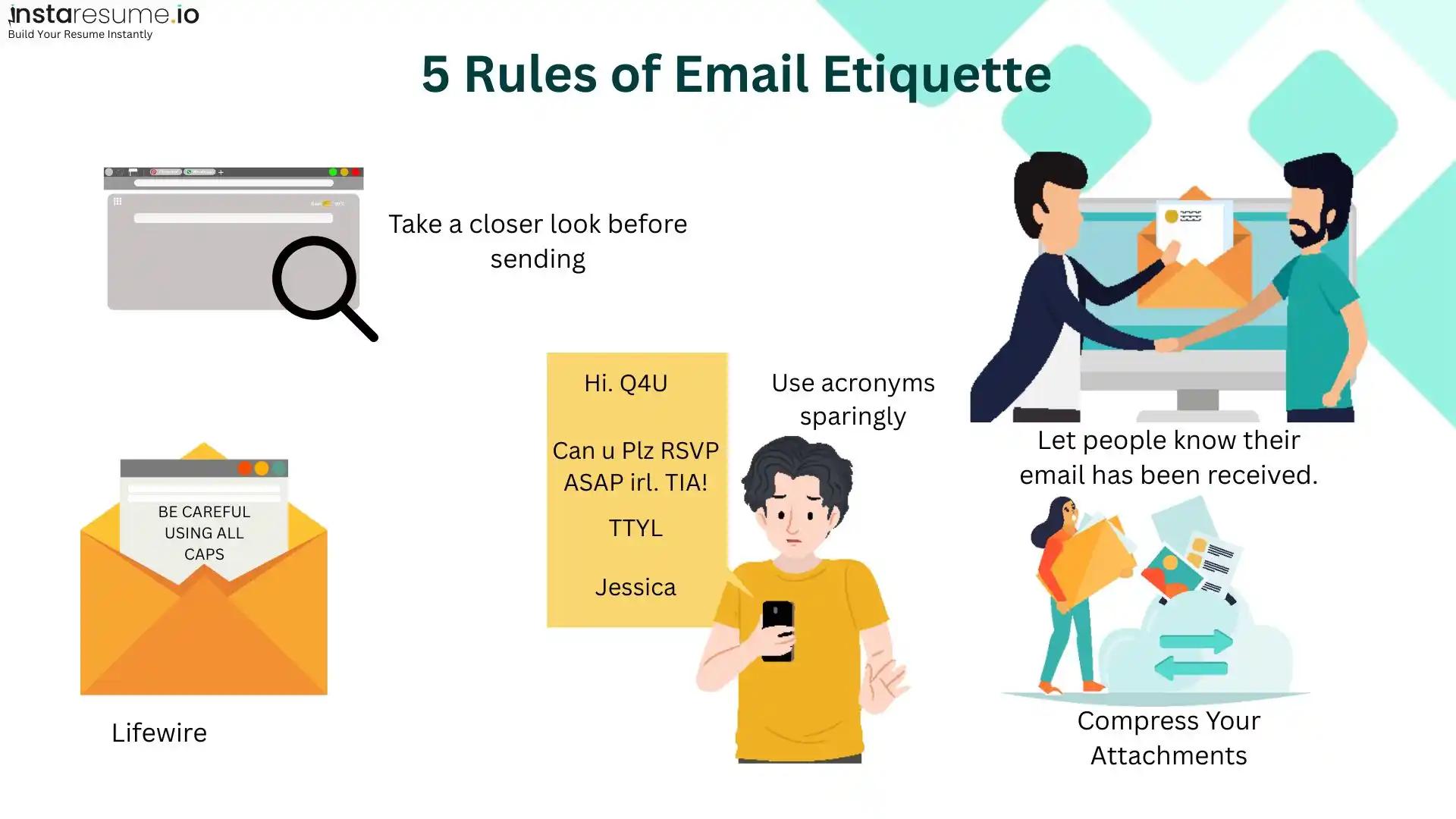
Before hitting send, always take a moment to review your email. Check for spelling errors, incorrect attachments, or missing recipients. A quick review can prevent misunderstandings and leave a strong impression especially when you’re communicating for job applications or professional follow-ups, similar to how attention to detail matters while creating a polished resume using an online resume builder
Avoid using excessive acronyms or texting-style language in professional emails. While abbreviations may save time, they can confuse the reader or appear unprofessional especially when writing to recruiters or senior professionals.
Using ALL CAPS can come across as aggressive or rude, even if that’s not your intention. Maintain a balanced tone by using standard capitalization and polite language throughout your message, something recruiters also look for when reviewing your resume format and cover letters.
Acknowledging received emails is a simple but powerful habit. A short confirmation reassures the sender and reflects professionalism, particularly in time-sensitive or work-related conversations. This habit complements strong follow-up skills discussed in job application tips.
Finally, keep attachments optimized. Large files can delay communication or fail to deliver. Compressing attachments or sharing links ensures smoother and faster email exchanges.
Etiquette guidelines for writing emails
Professional emails are not just about what you say, but how you say it. Strong email etiquette improves clarity, builds trust, and reflects your overall work ethic.
Keep these email writing guidelines in mind:
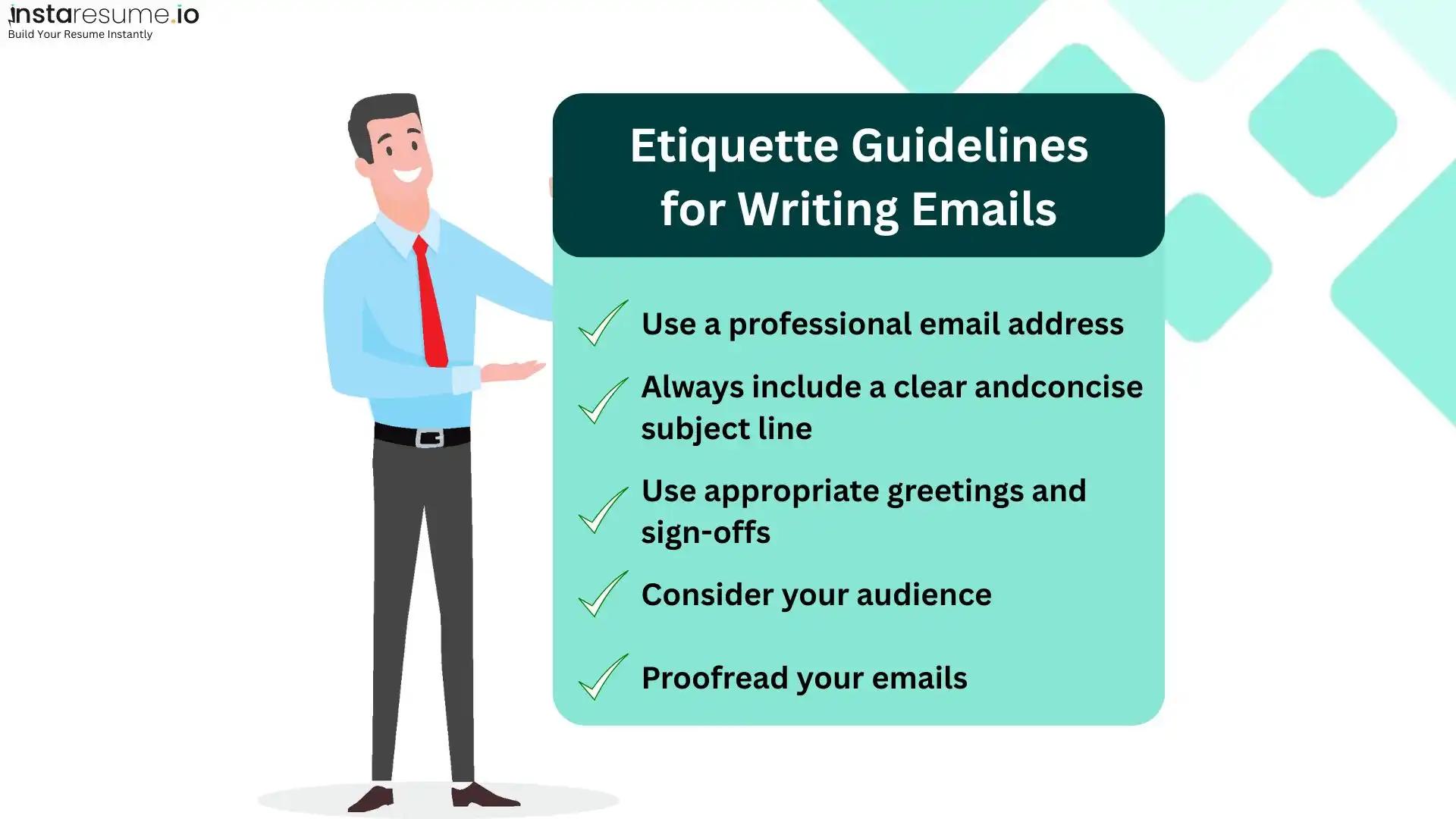
Always use a professional email address, especially for job applications and official communication. An email ID with your name creates credibility and avoids unnecessary distractions.
A clear and concise subject line helps the recipient understand the purpose of your email instantly. It also increases the chances of your email being opened and responded to promptly.
Use appropriate greetings and sign-offs based on your audience. A polite opening and a professional closing help set the right tone and leave a positive impression.
Consider who you are writing to before drafting the message. Adjust your language, formality, and level of detail depending on whether the recipient is a recruiter, manager, or colleague.
Lastly, proofreading is non-negotiable. Errors in grammar or spelling can reduce the impact of even the best-written message. A polished email reflects attention to detail and professionalism, qualities employers also expect in ATS-friendly resume templates.
FAQs
1. What is professional email etiquette?
Professional email etiquette refers to the accepted rules and best practices for writing emails in a workplace or business environment. It focuses on clarity, tone, structure, and respect to ensure messages are professional and effective. Following email etiquette helps avoid misunderstandings and builds credibility. It also reflects your communication skills and professionalism.
2. Why is professional email etiquette important in the workplace?
Email etiquette is important because emails are often used as official records of communication. Poorly written emails can cause confusion, delays, or conflict. Professional email etiquette ensures clear communication, saves time, and strengthens workplace relationships. It also creates a positive impression on colleagues, managers, and clients.
3. What should a professional email include?
A professional email should include a clear subject line, appropriate greeting, concise message body, polite tone, call to action, and a professional sign-off. Proper formatting and correct grammar are also essential. Including a professional email signature adds credibility. Each element works together to ensure effective communication.
4. How do I start a professional email?
A professional email should start with a respectful greeting such as “Dear,” “Hello,” or “Hi,” followed by the recipient’s name or title. The greeting should match the level of formality required for the situation. Starting politely sets the tone for the rest of the email. Avoid starting emails abruptly without a salutation.
5. What are the most common professional email etiquette mistakes?
Common mistakes include using unclear subject lines, poor grammar, overly casual language, sending emotional emails, and replying late. Overusing “Reply All” and forgetting attachments are also frequent errors. These mistakes can make you appear careless or unprofessional. Following basic email etiquette helps avoid these issues.
6. How long should a professional email be?
A professional email should be concise and focused, usually between 4–6 short paragraphs. Long emails can overwhelm readers and reduce response rates. If detailed information is required, consider using bullet points or attachments. Clear and brief emails are more effective in professional settings.
7. Is it acceptable to use emojis in professional emails?
In most professional environments, emojis should be avoided unless the company culture clearly allows them. Emojis can sometimes be misinterpreted or appear unprofessional. For formal communication with clients or senior leaders, it is best to avoid them entirely. Maintaining a neutral tone is safer.
8. How quickly should I respond to professional emails?
Ideally, professional emails should be answered within 24 hours. For urgent matters, responses should be faster or acknowledged promptly. Even if you need more time, a brief acknowledgment is considered good email etiquette. Timely responses show responsibility and respect for others’ time.
9. What is the best professional email sign-off?
Common professional email sign-offs include “Best regards,” “Sincerely,” “Kind regards,” and “Thank you.” The sign-off should match the tone of the email and your relationship with the recipient. Avoid casual endings like “Cheers” in formal emails. A proper sign-off leaves a positive final impression.
10. How can I improve my professional email writing skills?
You can improve your email writing by practicing clarity, proofreading every email, and following professional email etiquette guidelines. Observing how experienced professionals write emails can also help. Using templates and checking tone before sending are effective habits. Consistent practice leads to better communication skills.